
ATS resume builder: build for the parser, not the template wall
Most resume builders optimize how a resume looks. An ATS resume builder optimizes whether it gets read: parseable structure, matched vocabulary, and a score.
Search for a resume builder and you’ll find template galleries: two-column layouts, accent colors, skill bars, portrait photos. The implicit promise is that a better-looking document gets you hired. But the first reader of most resumes is not a person: it’s parsing software inside an applicant tracking system. An ATS resume builder is built for that reader first, and it turns out to be a different engineering problem: not “does this document look impressive” but “does this document get read at all”.
What most resume builders optimize
A conventional builder competes on what you can see at the moment you choose it: the template wall. Visual variety sells: sidebars, icons, skill meters, dense two-column grids. The problem is that the features that make templates look distinctive are the same features that most often break machine reading. Multi-column layouts scramble text order. Tables and text boxes drop content. Decorative section names (“Where I’ve made an impact”) don’t map to the fields a parser expects.
None of this is visible when you download the finished PDF. It becomes visible weeks later, as silence.
What an applicant tracking system actually does
Worth being precise here, because the folklore is worse than the reality. An ATS handles your resume in three steps:
- Parse. The document is converted into structured data: name, contact details, employers, titles, dates, skills, and the text of each section.
- Index. That structured record goes into a searchable database alongside every other applicant for the role.
- Rank and search. Recruiters search the pool using the posting’s own terms, sort by relevance, and read from the top.
The common myth (that the software auto-rejects anyone below some threshold) is mostly false. Most systems don’t reject anyone on their own. But the practical consequence is nearly identical: if your resume parses badly, or doesn’t contain the terms being searched, it sits in the database where nobody looks. You don’t get a rejection explaining that; you get no response at all.
So an ATS resume builder has one job: produce a document that survives step one intact and competes well in step three. That breaks down into three specific capabilities, and they’re a useful test for any tool that claims the label.
Test 1: structure that parses
The baseline is mechanical, and it’s closer to pass/fail than to a ranking factor:
- Real text. The exported PDF must contain selectable text, not a flattened image of text. If you can’t select and copy a sentence from your own file, a parser can’t extract it either.
- Standard section headings. “Experience”, “Education”, “Skills”, “Summary”. Parsers map headings to database fields by matching known labels; a clever heading is an unmapped field.
- A single column. Parsers read in one flow. Multi-column layouts interleave unrelated lines and can shuffle your history into nonsense.
- Consistent, text-based dates for every role, so your timeline reconstructs correctly.
A plain document that parses beats a beautiful one that doesn’t, every time. The specifics (what actually breaks parsers, what’s harmless, and what a safe layout looks like) are covered in ATS-friendly resume templates.
Test 2: vocabulary that matches the posting in front of you
Structure gets you parsed; vocabulary gets you found. This is where the keyword features of many builders fall short: suggestions like “leadership”, “results-driven”, “team player” come from a generic bank, which means they’re the same words every other applicant adds, and rarely what a recruiter actually types into the search box.
The keywords that matter for a given application live in that posting: the named tools and skills in the requirements section, the noun phrases in the responsibilities (“funnel optimization”, “stakeholder management”), anything repeated. A genuinely ATS-oriented builder works against the posting you’re applying to, extracting its terms and comparing them to your text, rather than sprinkling from a master list. The extraction method is its own topic: here’s how to find the resume keywords a posting screens for.
Just as important is what the tool refuses to do with those keywords. Adding a skill you don’t have closes a gap on paper and opens one in the interview. Rephrasing what you actually did into the posting’s wording is tailoring; inventing is not.
Test 3: a measurable feedback loop
A badge that says “ATS-safe” is a claim you can’t check. A number against a specific posting is one you can. The difference changes how you work: with a score, you edit, re-score, and watch the gap close; with a badge, you hope.
A useful score is keyword coverage: how much of what this posting asks for appears in your resume’s text, with the missing terms listed so you know exactly what each point would cost to earn. It should also be deterministic: the same resume and the same posting producing the same number every time. Otherwise you can’t tell whether your edit helped or the meter just wobbled.
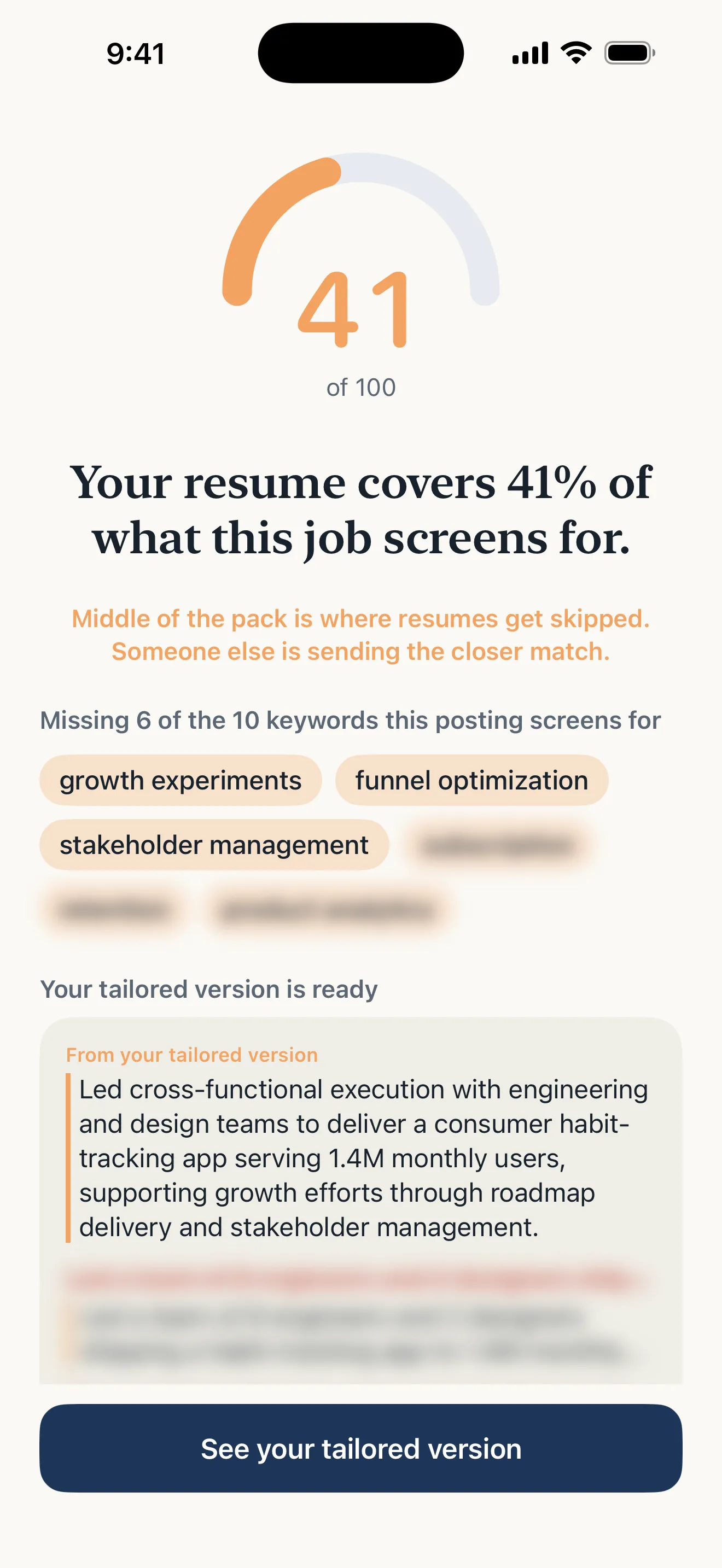
A feedback loop you can act on: a score against this posting, and the exact missing keywords behind every point.
Build once, tailor per posting
Here’s the workflow mistake even careful people make: treating each application as a new document. If your builder’s unit of work is “make a resume”, you either send the same generic file everywhere or rebuild it per posting by hand, and rebuilding is where errors creep in. Dates drift, bullets fork into inconsistent versions, and soon you can’t say which file is the truth.
The better model is one master resume containing everything you’ve actually done, then a per-posting pass that changes emphasis and vocabulary but never facts: rephrase existing bullets into the posting’s language, surface the buried relevant experience, reorder so the first skim hits the match. That’s tailoring, and it’s a few minutes of delta on a stable document instead of a rebuild from scratch.
How Sarto approaches it
Sarto is an iOS app built around exactly these three tests:
- You start from your real resume (import a PDF, snap a photo, or paste the text) or build one from scratch with guided steps. Either way the result is one master document, not a per-application rebuild.
- Add a job posting by pasting it or sharing it from another app, and Sarto computes a deterministic 0–100 match score, with the posting’s missing keywords shown as chips.
- Tailoring rewrites your resume for that posting, and every change appears as a diff you can reject. The honesty rule is enforced by the server, not by a prompt: the AI cannot invent employers, titles, dates, or skills.
- Export is a PDF in one of three templates: Classic serif, Modern sans, Compact. All are single-column and built to parse.
- Every application lives in a home list, so ten tailored versions don’t decay into ten mystery files.
The short version
A resume builder is ATS-oriented if it passes three tests. The documents it produces parse cleanly: real text, standard headings, single column. It works from the vocabulary of the posting you’re actually applying to, not a generic keyword bank. And it gives you a measurable, repeatable score against that posting instead of a vague badge. Everything else (fonts, colors, template count) is secondary to whether the document gets read.